



Silhouette Cameo 5: Alpha, Alpha Plus and Pro Compared
 Published
 Updated

There is no machine called the Silhouette Cameo 5. The current generation is sold as the Cameo 5α, usually written Cameo 5 Alpha, with a wider Cameo 5α Plus above it and the Cameo Pro MK-II at the top of the range. Searching for a plain Cameo 5 lands you on the Alpha.
That naming gap causes more confusion than it should, and it is the first thing to sort out before shopping. People who bought a Cameo 4 three years ago expect a Cameo 5 to appear and instead find a Greek letter attached to the name. Silhouette used the alpha designation to mark a redesigned carriage and registration system rather than a simple number bump, and the difference between the models in the range is mostly about how wide a piece of material each one will take.
This breakdown compares the current Silhouette Cameo 5 generation machines on the numbers Silhouette publishes, then answers the question most buyers are actually asking: which one do you need, and does any of it matter if you already own a Cameo 4? If you are completely new to the platform, the Cameo beginner walkthrough covers Silhouette Studio and the first cut, and almost all of it still applies.
The Current Cameo Range at a Glance
Two machines carry the Cameo 5 generation badge, the Cameo Pro MK-II sits above them as an older professional model, and one earlier pair is still being cleared. The table below covers the two current Alpha machines, because those are the two whose full specifications Silhouette publishes side by side.
Cameo 5α and 5α Plus compared
| Spec | Cameo 5α | Cameo 5α Plus |
|---|---|---|
| Operating area with mat | 12 x 24 in | 14.6 x 15 in |
| Material width taken | 12 in | 15 in |
| Max cutting length | 16 ft | 16 ft |
| Max material thickness | 3 mm | 3 mm |
| Cutting speed | 1 to 300 mm/s | 1 to 300 mm/s |
| Sketching speed | up to 400 mm/s | up to 400 mm/s |
| Tool holders | 2 | 2 |
| Registration | Four point | Four point |
| List price from | $279.99 | Above the 5α |
The pattern is obvious once it is laid out. Cutting engine, speed and thickness are identical across the 5α and the 5α Plus. You are paying for width, and only for width. Silhouette does not publish an equivalent specification sheet for the Cameo Pro MK-II alongside these, which is itself a signal about where that machine sits in the range.
Cameo 5α: the Default Choice
The Cameo 5α specification page gives a guaranteed operating area of 12 by 24 inches on a mat, and 11.6 inches by 16 feet on lined material fed without a mat. Material up to 3 mm thick is supported, which covers craft foam and thin balsa as well as the obvious vinyl and cardstock.
Two numbers on that page matter more than the rest. Cutting speed runs from 1 to 300 mm per second in graduated steps, and sketching runs up to 400 mm per second. The 400 figure appears in a lot of marketing copy as if it were the cutting speed. It is not. If you are comparing machines on speed, compare the 300, because that is the number that governs how long a real vinyl job takes.
Two tool holders is the other figure that shapes how you work. With two plungers you can load a blade and a pen and run a draw and cut job in one pass, which is how card makers produce a scored, written and cut card without unloading the mat. Cutting shirt designs and layered decals only ever needs one tool, so the second holder sits unused for a lot of owners.
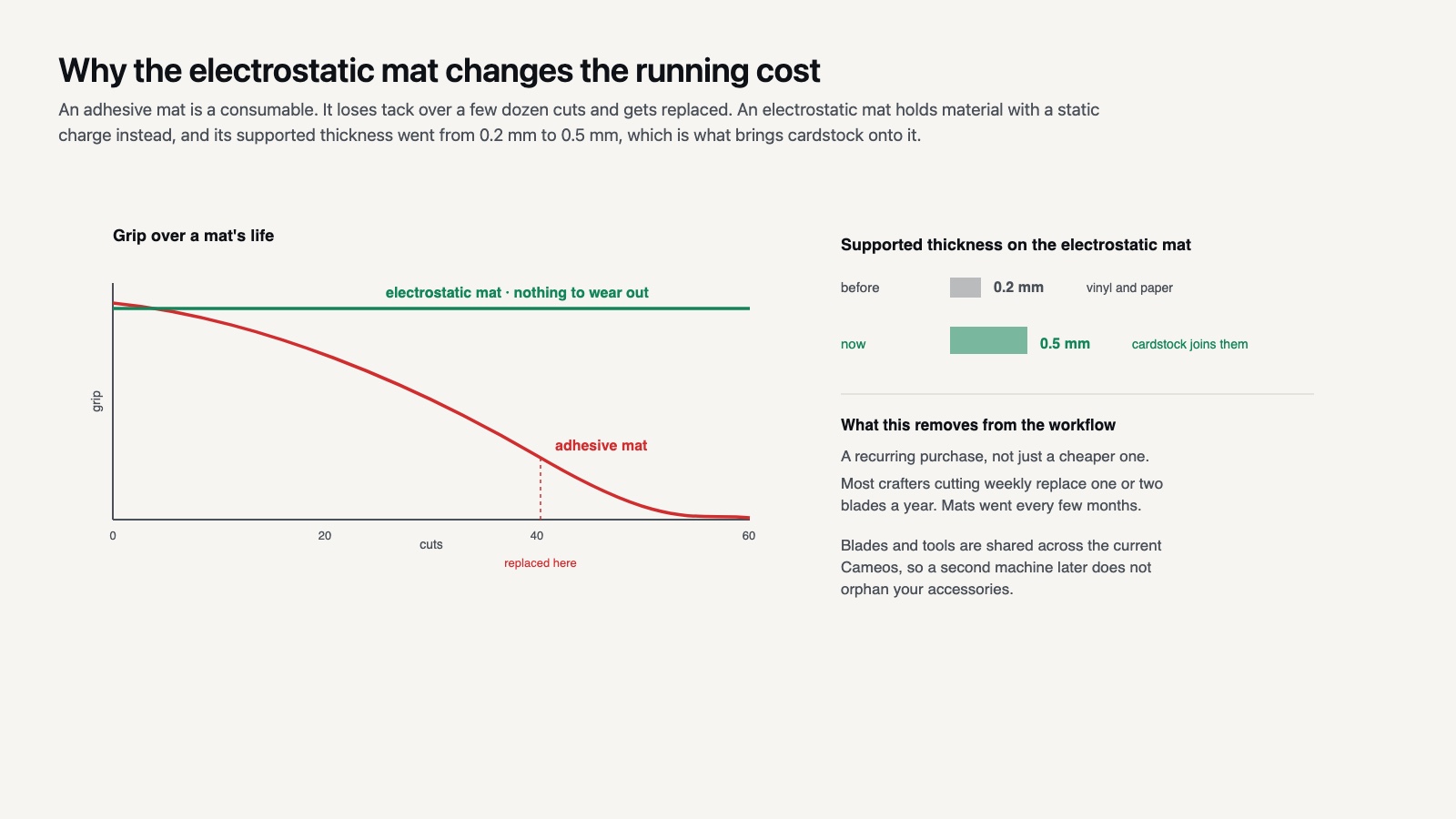
The other change worth knowing about is the electrostatic mat, whose supported thickness went from 0.2 mm to 0.5 mm. That is the adhesive free mat that holds material by static charge instead of tack, and the increase is what makes cardstock practical on it. Adhesive mats lose grip over a few dozen cuts; an electrostatic mat that can hold cardstock removes a recurring consumable from the workflow.
🔢 Quick Numbers
- 12 x 24 in guaranteed operating area on the Cameo 5α, per Silhouette America’s specification page
- 14.6 x 15 in on the Cameo 5α Plus, per Silhouette America’s specification page
- 3 mm maximum material thickness on both, per Silhouette America’s specification pages
- Electrostatic mat capacity raised from 0.2 mm to 0.5 mm, per Silhouette America’s Cameo 5α Plus page
Cameo 5α Plus: Fifteen Inches, and What It Costs You
The Cameo 5α Plus takes material up to 15 inches wide with a guaranteed operating area of 14.6 by 15 inches. Everything else is the same machine.
Whether that is worth the premium comes down to one question: do you cut heat transfer vinyl for adult garments? Standard HTV rolls are commonly 12 inches wide, but 15 inch stock exists and a full front design on an XL shirt is easier to place on a wider bed. If you mostly make decals, planner stickers and tumbler wraps, a tumbler wrap is under 10 inches tall and the extra width does nothing for you.
The trade is footprint. A machine that takes 15 inch material is physically wider than one that takes 12, and craft room desk space is usually the real constraint rather than budget.
⚖️ Pros & Cons at a Glance
✔️ Pros: identical cutting engine across the range so no capability is locked behind price, four point registration improves Print and Cut accuracy, 3 mm thickness covers materials most craft cutters refuse, electrostatic mat reduces consumable cost.
✖️ Cons: confusing model naming, the Plus buys width and nothing else, Silhouette Studio still gates useful features such as SVG import behind a paid edition, accessory ecosystem is smaller than Cricut’s.

Which Cameo Should You Buy?
For anyone typing Silhouette Cameo 5 into a search box with a shopping list in mind, the answer is short. If you cut vinyl, cardstock and HTV for personal projects or a small shop, the 5α is the machine. The Plus earns its price only when 12 inch material genuinely limits you, and most people discover that from a specific failed project rather than in advance.
The Cameo Pro MK-II sits in different territory. Silhouette lists it on the current machine range page at $499.99, against $279.99 for the 5α. It is a wide format production machine rather than a craft one, and it predates the four point registration system the Alpha machines introduced. Buying it for hobby use means paying for throughput you will not reach.
There is also the clearance question. Silhouette is running out the Cameo 4 Plus and Cameo 4 Pro at reduced prices. A Cameo 4 cuts the same materials as a Cameo 5α and is a legitimate purchase if the discount is deep. Two caveats apply. The older three point registration is less forgiving on Print and Cut, and accessory availability for a discontinued line shrinks over time.
💡 Pro Tip
Check which Silhouette Studio edition a bundle includes before you compare prices. Basic will not open an SVG, and the Designer Edition upgrade is a real cost that bundle listings sometimes bury. A cheaper machine with Designer Edition included can be the better deal than a dearer one without.

The Software Cost Nobody Quotes
Every Cameo ships with Silhouette Studio Basic. Basic will not open an SVG file. That single restriction shapes the whole purchase, because the overwhelming majority of cut files sold anywhere are SVG.
Designer Edition adds SVG import and is the edition most owners end up buying, either bundled with the machine or separately afterwards. Business Edition adds multi cutter support and tiling for oversized designs, which only earns its price in a production setting. Buying the machine and discovering the format limitation afterwards is one of the most common first week frustrations on the platform.
If you have come from a Cricut, the comparison is unflattering in one direction and flattering in the other. Design Space is free and opens SVG on day one, which is a genuine advantage, but it requires an internet connection and a Cricut account for almost everything. Silhouette Studio runs offline once installed. Anyone who has worked through the Design Space setup knows how much of it assumes a connection.
There is a workaround, and it is worth knowing before you spend: Basic opens DXF. Many cut file shops include a DXF alongside the SVG in the same download, so a library bought with DXF included stays usable on Basic. It is not a substitute for Designer Edition, because DXF carries no color or layer information, but it keeps you cutting while you decide.

Is the Cameo 5α Worth Upgrading From a Cameo 4?
For most Cameo 4 owners, no. The materials you can cut and the software you drive it with are unchanged. The upgrade argument rests on three things: the four point registration mark system, the redesigned carriage with the Power Carriage tool support, and the improved electrostatic mat.
Four point registration is the one that shows up in daily work. Silhouette added vertical and horizontal correction to the three point system, which means printed sheets that are slightly skewed in the printer still cut accurately. If your Print and Cut results drift by a millimeter or two and you have already recalibrated, that is the fix.
The Power Carriage matters if you want the Heat Pen or the Type C Embossing Tool, which draw power from the carriage rather than working passively. Those are genuinely new capabilities rather than refinements, but they are also niche. Card makers will care; someone cutting adhesive vinyl decals every weekend will not.
Can a Cameo 5α Do What a Cricut Maker 4 Does?
For cutting vinyl, HTV, cardstock and paper, the two machines are interchangeable in practice. The differences are in software and materials handling rather than in the cut itself.
Silhouette lets you cut without a mat on lined material and gives you manual control over blade depth, force and speed as separate numbers. Cricut abstracts those into named material presets and pushes you toward its own branded materials. Silhouette Studio is a heavier program with a steeper start; Design Space is easier on day one and more limiting on day three hundred.
Material compatibility is not really a differentiator. Heat transfer vinyl is cut the same way on both, and manufacturers publish one set of settings for both platforms. Siser’s HTV reference chart lists application temperature and time per product without distinguishing between brands of cutter, because the cutter has nothing to do with it.
Where Cricut pulls ahead is the knife blade and rotary blade ecosystem for thicker and softer materials. Where Silhouette pulls ahead is file freedom: you can work in any vector editor and bring the result in, which suits anyone building a library of cut file fonts and designs from multiple sources.
Running Costs Over the First Year
The purchase price is the smaller half of what a cutting machine costs. Blades, mats and material are the recurring part, and they differ between the models less than you would expect because the range shares a tool system.
Blades are the predictable expense. An autoblade dulls gradually rather than failing outright, and the symptom is tearing on tight corners rather than a clean stop. Most crafters cutting weekly replace one or two a year. Because the current Cameos share a tool system, a blade bought for a 5α fits a 5α Plus, which also means a second machine later does not orphan your accessories.
Mats are where the 5α range changes the math. A standard tack adhesive mat is a consumable that loses grip over a few dozen cuts and gets replaced. The electrostatic mat holds material with a static charge instead, so there is no adhesive to wear out, and the raised 0.5 mm capacity means it now covers cardstock rather than just vinyl and paper. Over a year of steady cutting that removes a repeat purchase rather than reducing it.
Getting the Most Out of Whichever You Buy
Machine choice matters less than the habits around it. Test cuts before committing a sheet, blade depth checked whenever material changes, and a mat cleaned rather than replaced will do more for your results than the difference between any two models in this range.
File quality is the other half. A badly drawn SVG with doubled paths will cut badly on a $500 machine and a $280 one alike. If you are building a design library, the general cutting machine guide covers the file checks that apply on either platform, and the Silhouette section collects the platform specific ones.
✅ Key Takeaways
- There is no plain Cameo 5. The current generation is the Cameo 5α, with a Cameo 5α Plus above it.
- The 5α and 5α Plus share cutting engine, speed and 3 mm thickness capacity. The Plus buys width only.
- 300 mm/s is the cutting speed; the 400 mm/s figure quoted in marketing is the sketching speed.
- Four point registration is the one upgrade a Cameo 4 owner will notice, and only on Print and Cut work.
- The Cameo Pro MK-II is a production machine at $499.99 and is overspecified for hobby use.
Putting It All Together
Buy the 5α unless you have a project that 12 inch material has already stopped you finishing. Width is the only axis on which these machines differ, and it is much easier to justify spending the difference once you have hit the limit than to guess in advance that you will.