



Cricut Maker 4 vs Maker 5: What Actually Changed
 Published
 Updated
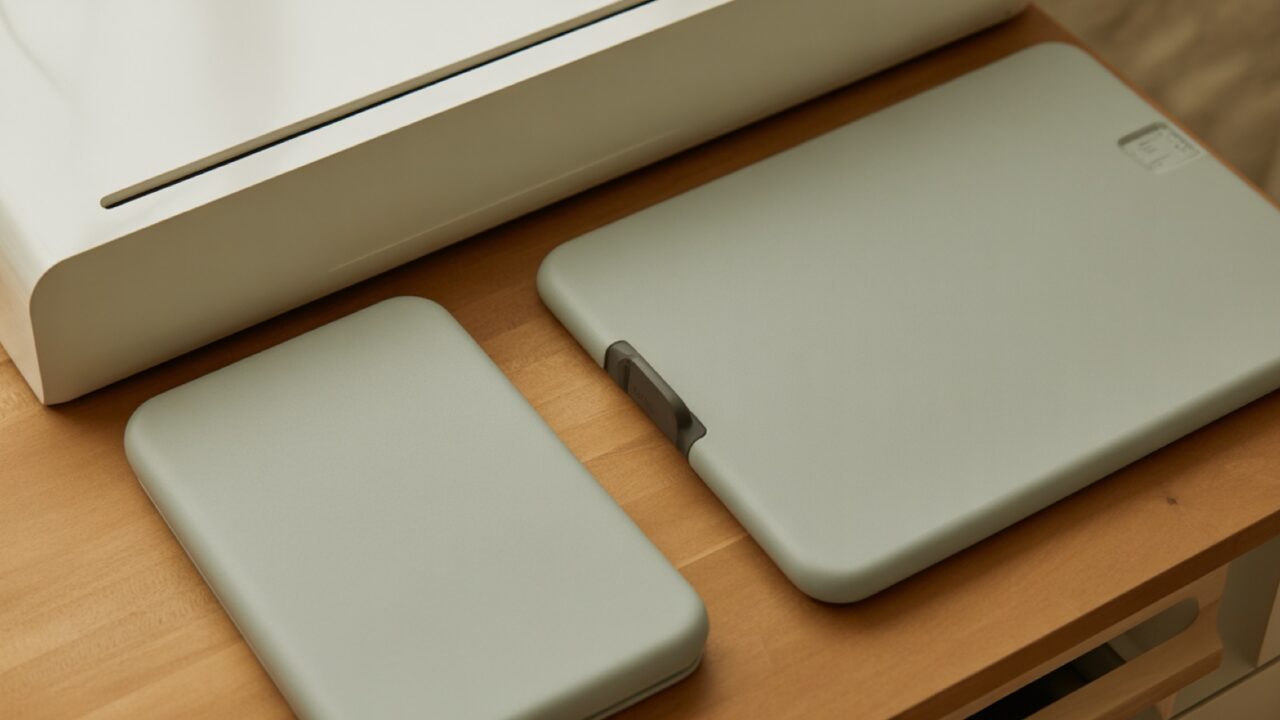
Cricut Maker 4 vs Maker 5 is now a live buying question. Maker 5 went on sale on September 4, 2026 and replaced the Maker 4. It is smaller, takes 3 mm material instead of 2.4 mm, and loads pens without an adaptor. Cutting capability is otherwise the same.
Generation changes in cutting machines are rarely dramatic, and this one follows that pattern. A new Explore 5 arrived alongside it. Nothing the Maker 4 could cut has been taken away, and nothing the Maker 5 cuts is impossible on the older machine except at the very top of the thickness range. What changed is the physical design, the way tools load, and how the machine connects to your computer.
That matters most to two groups: people about to buy their first serious machine, and Maker 4 owners wondering whether to trade up. Those two groups need different answers, and clearance pricing on Maker 4 stock complicates both of them. If you are new to the platform entirely, start with the cutting machine basics guide, because the fundamentals have not moved between generations.
What Cricut Actually Changed
On Cricut Maker 4 vs Maker 5, Cricut published the differences rather than leaving reviewers to measure them, and the list is short and specific.
The Maker 5 is 30 percent more compact than the Maker 4 and over 4 lb lighter. Material clearance rose from 2.4 mm to 3 mm, a 25 percent increase, which extends what can be cut and engraved at the thick end. Pens and markers now snap in directly instead of needing an adaptor. USB-A has been replaced by USB-C, and the machine supports Bluetooth Low Energy.
Everything else carries over. Maker 5 works with 300 or more materials and 13 tools, the same broad compatibility that defined the Maker line. Cricut’s Maker 5 announcement lists the full capability set, and the absences are as telling as the additions: no change to cutting width, no new blade type, no software platform shift.
Maker 4 and Maker 5 side by side
| Spec | Cricut Maker 4 | Cricut Maker 5 |
|---|---|---|
| Material clearance | 2.4 mm | 3 mm |
| Materials supported | 300+ | 300+ |
| Tools | 13 | 13 |
| Pen loading | Adaptor needed for many pens | Snap in |
| Wired connection | USB-A | USB-C |
| Footprint | Baseline | 30% smaller, 4 lb lighter |
| Availability | Clearing through retail | From September 4, 2026 |
Read that table as a design refresh with one capability change. The 0.6 mm of extra clearance is the only row that lets the new machine do something the old one cannot.
Does the Extra 0.6 mm Matter?
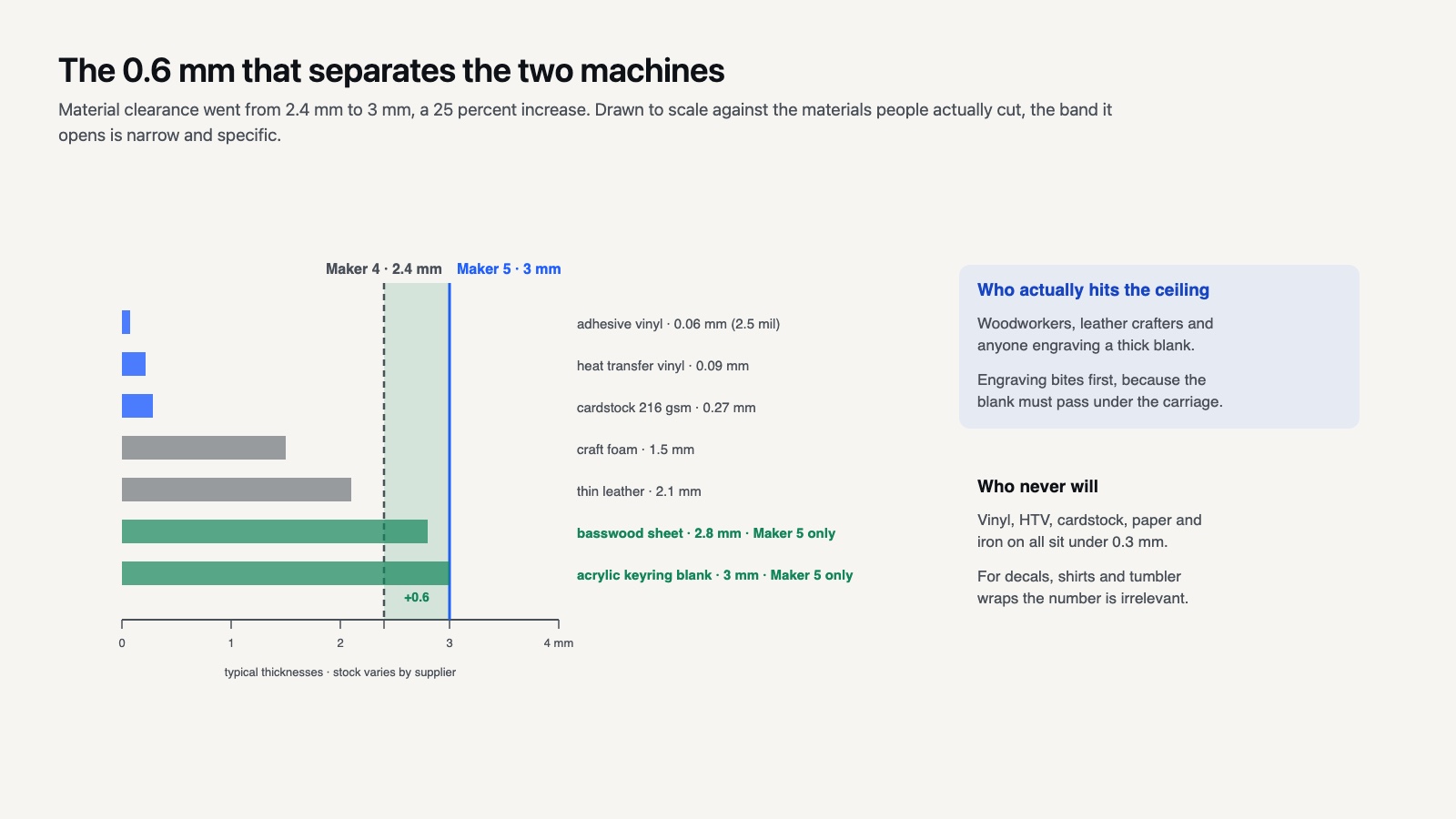
For most people, no. Materials sitting between 2.4 mm and 3 mm are a narrow band: thicker basswood, heavier leather, some acrylics and the denser craft foams.
If you cut vinyl, heat transfer vinyl, cardstock, paper and iron on, you will never approach 2.4 mm, let alone exceed it. A roll of adhesive vinyl is a fraction of a millimeter. Extra clearance is meaningful only if your projects already push the knife blade, which in practice means woodworkers, leather crafters and people making rigid signage.
It also matters for engraving. Engraving a thicker blank is where the clearance limit bites first, because the material has to pass under the carriage before any tool touches it. Anyone who has tried to engrave a chunky acrylic keyring on an older Maker knows the machine refuses before it even starts. That specific frustration is what the 3 mm figure solves. For decals, shirts and tumbler wraps, the number is irrelevant.
⚖️ Pros & Cons at a Glance
✔️ Pros of moving to the Maker 5: noticeably smaller desk footprint, 3 mm clearance opens thick engraving and woodwork, snap in pens remove a fiddly adaptor, USB-C matches current laptops.
✖️ Cons: no cutting capability gain for vinyl, paper or fabric users, same 12 inch width, same tool set so nothing new to buy into, and Maker 4 clearance pricing makes the older machine far better value for money.
Should You Buy a Discounted Maker 4 Instead?
This is the question the launch created, and for a lot of buyers the honest answer is yes.
A Maker 4 on clearance cuts the same 300 plus materials with the same 13 tools and the same 12 inch width. It is bigger and heavier, its pens need an adaptor, and it connects over USB-A. None of those are capability limits. They are inconveniences with a price attached, and if the discount is meaningful the trade is straightforward.
Two things are worth weighing. Accessory availability for a discontinued machine shrinks, though Cricut’s tool ecosystem is shared across the Maker line so this is a slower decline than it sounds. And the discount only applies to the Maker 4 itself: the speed improvement, cutting up to twice as fast as the previous generation when working on a mat, arrived with the 4 series, so an even older machine bought second hand is genuinely slower rather than just older looking.
If you are buying to start a small shop rather than to hobby cut, the money saved on a clearance Maker 4 buys a lot of material and file library. Most new sellers underestimate both. The shirt production walkthrough gives a realistic sense of the consumables involved before the machine has paid for itself.
💡 Pro Tip
Check the bundle contents, not the machine price, when a generation turns over. Clearance bundles frequently pad the box with material packs and a tool set that would cost more separately than the discount itself. A bare new machine at a lower headline price can leave you spending the difference in week one.
What the Redesign Feels Like in Use
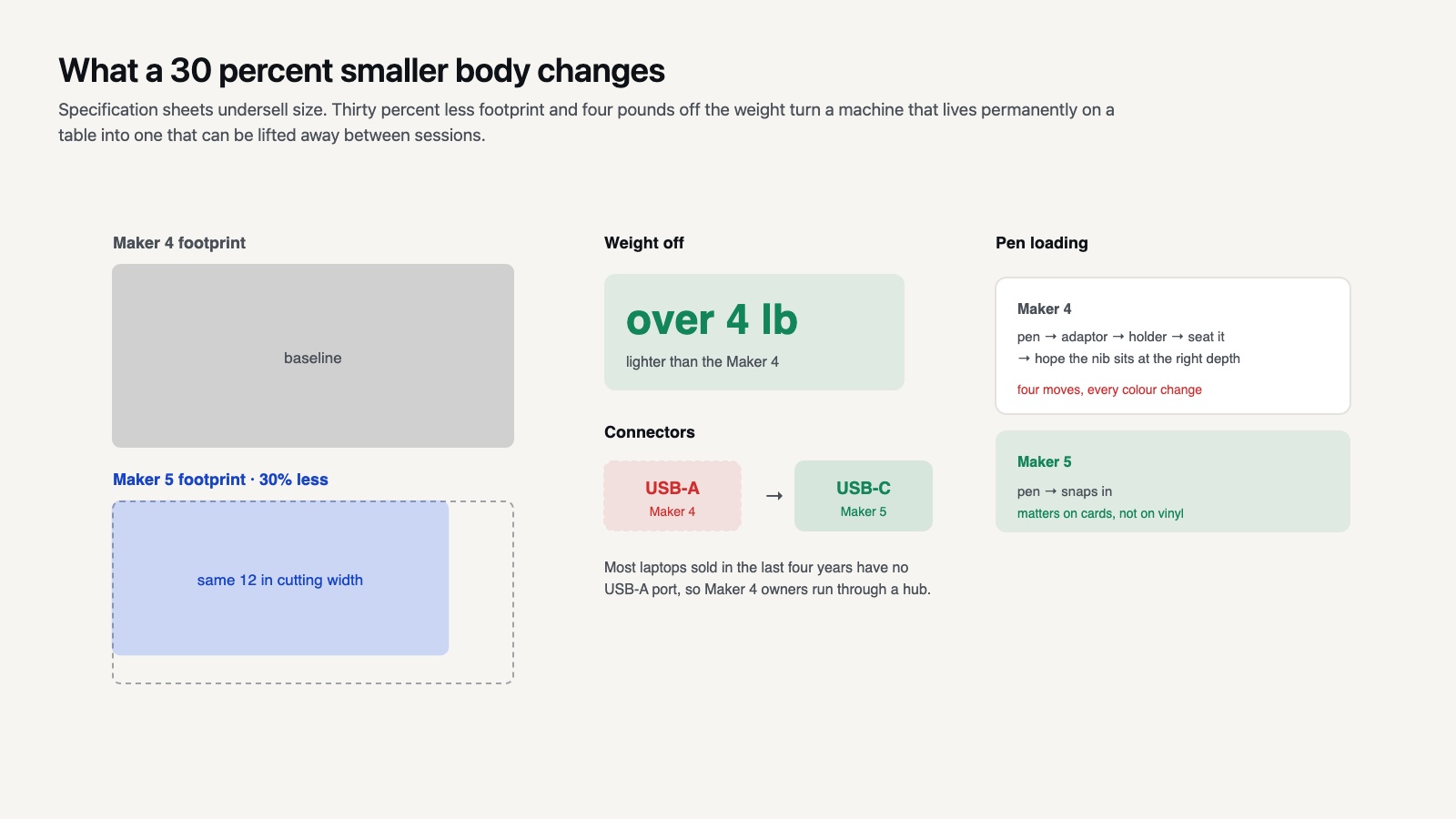
Specification sheets undersell size changes. Thirty percent less footprint and four pounds off the weight turn a machine that lives permanently on a table into one that can be lifted into a closet between sessions. For anyone crafting in a shared room, that is the difference between using it weekly and using it monthly.
Pen loading is a smaller change but a more frequent one. On earlier Maker machines, swapping between a cut and a draw step meant fitting a pen into a holder adaptor, seating it, and hoping the nib sat at the right depth. Snap in loading removes that step, which matters if you make cards or labels where every project alternates between drawing and cutting. For pure vinyl work you will load a blade once and never think about it.
USB-C is the quiet one. Most laptops sold in the last four years have no USB-A port at all, so Maker 4 owners have been running through a hub or relying on Bluetooth. Bluetooth works, but a wired connection is still the fix when a long cut drops mid job, and being able to make that connection without an adaptor removes a small recurring annoyance. Machines that connect over phones and tablets are unaffected either way, since that path was always wireless.
Where the Explore 5 Fits
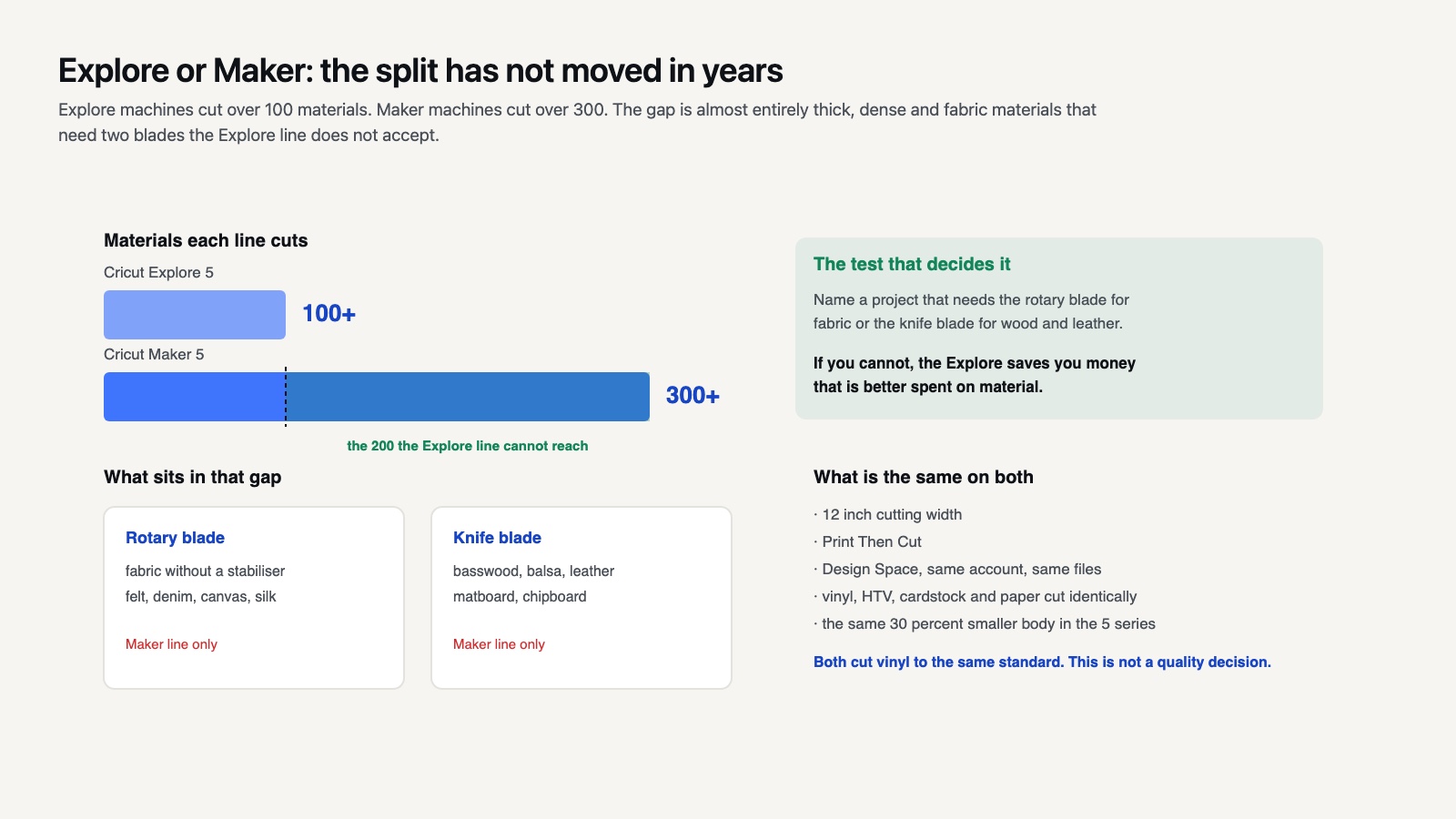
The Cricut Explore 5 is the smaller sibling, and the split between the Explore and Maker lines has not changed in years. Explore machines cut over 100 materials; Maker machines cut over 300. That gap is made up almost entirely of thick, dense and fabric materials needing the rotary blade or the knife blade, neither of which the Explore line accepts.
The Explore 5 got the same 30 percent size reduction and the same interface refresh, with the identical 12 inch cutting width the Explore line has always had. It remains the correct machine for anyone whose work is vinyl, iron on, cardstock and paper, which honestly describes most craft businesses.
The decision between Explore and Maker is not about quality. Both cut vinyl to the same standard. It is entirely about whether you will use the rotary blade for fabric and the knife blade for wood and leather. If you cannot name a project that needs one of those, the Explore saves you money that is better spent elsewhere.
What About Print Then Cut and the Software?
Both new machines do Print Then Cut, and Cricut has published a machine specific walkthrough for the Explore 5 in its help center. Nothing about the workflow has changed: print the sheet with the registration box, load it in the top left of the mat, let the sensor find the marks.
Design Space remains the only software, on both generations, with the same account requirement and the same online dependency. No version of the Maker 5 runs a different program or opens a different file set. If Design Space frustrates you on a Maker 4, it will frustrate you identically on a Maker 5, which is worth saying plainly because software friction is the most common reason people abandon a machine.
File handling is unchanged too. SVG remains the format for cut designs and PNG for Print Then Cut, and a file that behaves on one generation behaves on the next. Anyone building a cut file and font library can do it without reference to which machine they will own in two years.
What the Generation Change Does to Resale and Accessories
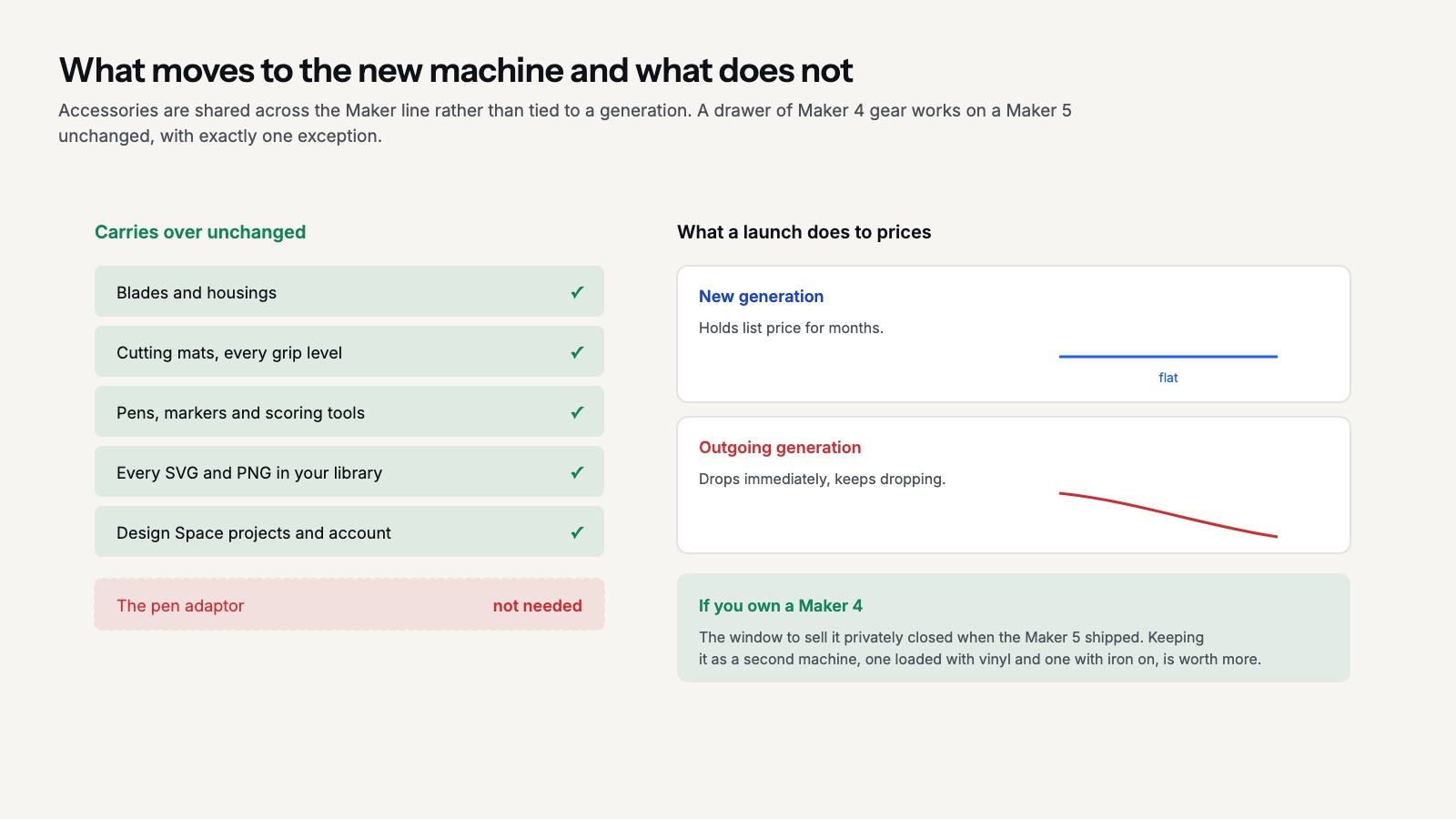
A launch moves prices in both directions. New machines hold their list price for months; the outgoing generation drops immediately and keeps dropping through the following season.
Second hand Maker 4 prices will follow the clearance price down, which is good news if you are buying and worth knowing if you are selling. The sensible window to sell a Maker 4 privately was before the Maker 5 shipped, and that window has closed. Holding it as a second machine for a second material, one loaded with vinyl and one with iron on, is usually more valuable than the money it now fetches.
Accessories are the better news. Blades, housings, mats and pens are shared across the Maker line rather than tied to a generation, so a drawer of Maker 4 accessories moves to a Maker 5 unchanged. One item does not carry over, the pen adaptor, which the new machine makes unnecessary. Mats in particular are generation agnostic, and a stack of StandardGrip mats bought on sale stays useful whatever machine sits on the desk. Your file library moves across untouched too, whether that is PNG sets for Print Then Cut or layered SVG designs.
The Upgrade Decision, Honestly
The Cricut Maker 4 vs Maker 5 answer splits by who is asking. Maker 4 owners: do not upgrade for the cutting. Upgrade if desk space is a real constraint, if you engrave thick blanks, or if the pen adaptor has genuinely annoyed you for a year. Those are legitimate reasons and Cricut has addressed them well. Cutting quality is not one of them.
Maker 3 and Explore 3 owners: the speed improvement landed with the 4 series rather than the 5, so moving up two generations gives you both the speed and the redesign in one purchase. That is a stronger case than a single generation jump.
First time buyers: decide Explore or Maker first, based on whether fabric and wood are in your plans. Then decide 4 or 5 based purely on what the price difference is on the day. The official comparison chart is the place to confirm what is currently in the range, since it updates as models rotate out.
Whichever you land on, the machine is the part of this hobby that changes least. Blades, mats, material settings and file quality decide your results far more than the model number does, and all of that knowledge transfers. The Cricut section collects the workflow guides that stay true across generations, and the Design Space guide is where new owners should start on day one regardless of which box arrived.
The Bigger Picture
Bottom Line: The Maker 5 is a smaller, better built Maker 4 with 0.6 mm more clearance and modern connectors, not a more capable cutter for ordinary craft materials. Buy it if the footprint, the pen loading or thick engraving matter to you, and buy the clearance Maker 4 if they do not.